X
wikiHow is a “wiki,” similar to Wikipedia, which means that many of our articles are co-written by multiple authors. To create this article, volunteer authors worked to edit and improve it over time.
This article has been viewed 17,574 times.
Learn more...
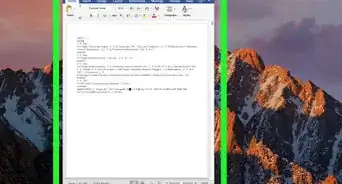
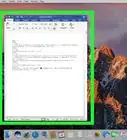
This wikiHow will show you how to enable focus mode in Microsoft Word. Focus mode hides the taskbar (or dock on Mac) and the ribbon and only shows your Word document, which reduces distractions and helps you focus on the document.
Steps

Method 1
Method 1 of 2:Turning on Focus Mode
Method 1
-
1Click on the focus button. This button has a document surrounded by a box and is located on the bottom toolbar.
-
2Click on the View tab. This tab is located on the ribbon at the top.
-
3Click on Focus. This button has a document surrounded by a box. It is located in the "Immersive" group.
-
4Type Focus into the search bar. This will show the "Focus mode" command that you can then click on.


Method 2
Method 2 of 2:Turning off Focus Mode
Method 2
-
1Click on the top of the screen. On Mac, just move your cursor to the top of the screen.
-
2Click on Exit focus mode on Mac. This will turn off focus mode on your Mac.
-
3Click on the restore button on Windows. This will bring the window down, effectively turning off focus mode.
-
4Click on the focus button. This button has a document surrounded by a box and is located on the bottom toolbar.
-
5Click on the View tab. This tab is located on the ribbon at the top.
-
6Click on Focus. This button has a document surrounded by a box. It is located in the "Immersive" group.
-
7Type Focus into the search bar. This will show the "Focus mode" command that you can then click on.


Community Q&A
-
QuestionI don't have the Focus button. Why is that?
 Zhongli, Archon of Liyue (Aasim)Community AnswerIf you do not have Office 365, you will not be able to use Focus Mode.
 -
QuestionI have Office 365 for Mac. Still don't have focus mode. Why?Zhongli, Archon of Liyue (Aasim)Community AnswerFocus mode is only available on Microsoft Word (not Word Online). You may not have the latest version of Word, either.