X
wikiHow is a “wiki,” similar to Wikipedia, which means that many of our articles are co-written by multiple authors. To create this article, volunteer authors worked to edit and improve it over time.
The wikiHow Tech Team also followed the article's instructions and verified that they work.
This article has been viewed 1,568 times.
Learn more...
Shake to Undo is a very handy function that is on iOS devices which allows you to undo typing by shaking your device. This wikiHow will teach you to turn this function on or off on iPhone.
Steps
-
1
-
2Scroll to and click on Accessibility. Here you can change settings for vision, hearing, touch and other iPhone senses.
-
3Click on Touch > under the section “Physical and Motor”. This is where all the commands and changes for touch are stored.
-
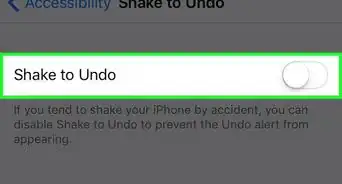
4Switch the flip labeled Shake to Undo to turn on or off the function. When the circle of the switch is on the right side and the switch is illuminated in green, the function is on.
- If you tend to shake your iPhone on accident a lot, you should turn the function off. It will be rather frustrating to have the widget pop up randomly when you make movements.