X
This article was written by Nicole Levine, MFA. Nicole Levine is a Technology Writer and Editor for wikiHow. She has more than 20 years of experience creating technical documentation and leading support teams at major web hosting and software companies. Nicole also holds an MFA in Creative Writing from Portland State University and teaches composition, fiction-writing, and zine-making at various institutions.
This article has been viewed 14,153 times.
This wikiHow teaches you how to convert your Excel workbook to a shared document. This allows multiple people on the network to edit the same file.
Steps
-
1Open the workbook you want to share. Double-click the file on your computer to open it in Excel.
-
2Click the Review menu. It’s at the top of Excel (in the menu bar on a Mac), near the center.Advertisement
-
3Click Share Workbook. It’s in the “Changes” group on the ribbon at the top of the screen. Look for the icon of a spreadsheet with a double-headed blue arrow.
-
4Click the Editing tab. If you’re already there, skip to the next step.
-
5Click the check box. It’s at the top-left corner of this tab. This makes it possible for more than one person to use the file at the same time.
-
6Click the Advanced tab. It’s next to the “Editing” tab.
-
7Set your workbook to automatically save at a regular interval. Here’s how to do it:
- Click Automatically every under “Update Changes.”
- Select a number of minutes from the drop-down menu. The default is 15.
-
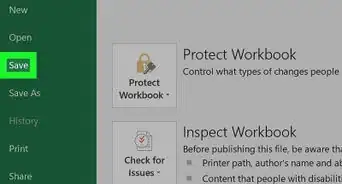
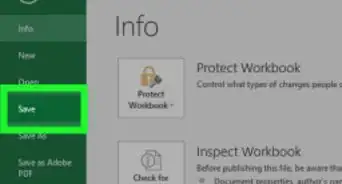
8Click OK. Now you’ll be prompted to save the file.[1]
-
9Save the file. If you created a new file, type a name for the file now. If it’s an existing file, click OK to save your changes.
-
10Click Share. It’s at the top-right corner of Excel. Look for the outline of a person with a “+” symbol.
-
11Click Save to Cloud. A list of saving locations will appear.
-
12Click the network location on which you want to share the file. This will save the file to that location.
- For example, if you use OneDrive and so does the person you’re sharing with, select OneDrive.
- If you’re on a local network, select a network folder to which you and other sharers have access.
Advertisement





References
About This Article

Nicole Levine, MFA
Tech Specialist
This article was written by Nicole Levine, MFA. Nicole Levine is a Technology Writer and Editor for wikiHow. She has more than 20 years of experience creating technical documentation and leading support teams at major web hosting and software companies. Nicole also holds an MFA in Creative Writing from Portland State University and teaches composition, fiction-writing, and zine-making at various institutions. This article has been viewed 14,153 times.
How helpful is this?
Co-authors: 1
Updated: March 29, 2019
Views: 14,153
Categories: Microsoft Excel
Advertisement