This article was co-authored by wikiHow Staff. Our trained team of editors and researchers validate articles for accuracy and comprehensiveness. wikiHow's Content Management Team carefully monitors the work from our editorial staff to ensure that each article is backed by trusted research and meets our high quality standards.
The wikiHow Tech Team also followed the article's instructions and verified that they work.
This article has been viewed 114,577 times.
Learn more...
This wikiHow teaches you how to search for people you may want to add to your friends list in a city of your choice, using a desktop internet browser.
Steps
-
1Open Facebook in your internet browser. Type www.facebook.com in your browser's address bar, and press ↵ Enter on your keyboard. Facebook will open up to your News Feed.
- If you're not automatically signed into Facebook in your browser, enter your email address or phone number, and your password to log in.
-
2Click your first name. This button is located next to the Home button in the upper-right corner of your browser screen. It will open your profile page.
- Alternatively, you can click your full name at the top of the navigation menu in the upper-left corner of your News Feed.
Advertisement -
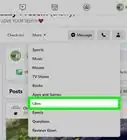
3Click your Friends tab. It's between About and Photos below your cover photo. It will open a list of all your friends.
-
4Click the +Find Friends button. This button is located above the Search for your friends box in the upper-right corner of your Friends list. It will open a list titled People You May Know, showing profiles of people you may want to add to your friends list.
- If you currently have friend requests you haven't responded to, you will see a list of your pending friend requests above the People You May Know list.
-
5Find the Current City section in the Search for Friends box. The Search for Friends box is located on the right-hand side of your screen. Here you can use a variety of filters on your People You May Know list, such as name, hometown, employer, and current city.
-
6Select a city under Current City. Click and check the box next to the city you want to select. This will filter your People You May Know list, and only show you people who live in your selected city.
- Optionally, click the text field at the bottom of the list, and type a city. Here you can enter and select any city to filter your results.
Advertisement



About This Article

1. Open Facebook in a browser.
2. Click your first name in top-right.
3. Click the Friends tab.
4. Click +Find Friends.
5. Find Current City in the Search for Friends box.
6. Enter a city to filter.