X
wikiHow is a “wiki,” similar to Wikipedia, which means that many of our articles are co-written by multiple authors. To create this article, volunteer authors worked to edit and improve it over time.
The wikiHow Tech Team also followed the article's instructions and verified that they work.
This article has been viewed 78,183 times.
Learn more...
File Explorer is the new file manager for Windows 8 and Windows 10. It has a newer interface compared to its predecessor, Windows Explorer.[1] File Explorer lets you manage and view your files, browse network locations, share files with your homegroup, and more.
Steps
-
1
-
2Use the built-in search.
- Windows 10 users can simply search via the search bar on their taskbar. If that isn't present, press the Start button and begin typing.
- If you're running Windows 8.1, press ⊞ Win+C and select the 🔎 Search charm. Type file explorer and click or tap on the result.
-
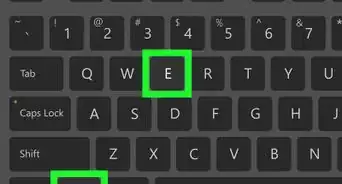
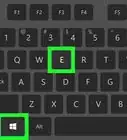
3Press the ⊞ Win+E keys on your keyboard.
-
4Right-click on the Start button and select File Explorer from the bottom. If you are using a touch device, simply hold down instead of right-clicking.
-
5Open it via the Start menu/screen.
- Windows 10: Select the File Explorer folder icon from the left pane.
- Windows 8.1: Press the down arrow with a circle around it (bottom-left of screen) to open your apps list. Look for and select File Explorer. Additionally, you can use the search at the top-right hand side of the page.
-
6Press ⊞ Win+R and type explorer or explorer.exe. Hit ↵ Enter or click OK.


Community Q&A
-
QuestionWhat is the difference between Internet Explorer and File Explorer?
 Chris (Byankno1)Top AnswererInternet Explorer is an internet browser. File Explorer allows you to explore all the files that exist on your computer (much like a file cabinet).
 -
QuestionWill these methods work for older versions of Windows?
 Community AnswerThis article is primarily for users running Windows 8. 8.1, and 10. If you're running an older version of Windows, see How to Open Windows Explorer.
 -
QuestionDid Microsoft rename Windows Explorer to File Explorer?
 Bat 🦇Top AnswererYes. It occurred with the release of Windows 8, alongside the addition of the ribbon.
 -
QuestionHow do I make a new file?Bat 🦇Top AnswererThere are many different files that consist of different content, such as image or text files. Read How to Make a New File in Windows.
-
QuestionHow can I find my photos?Bat 🦇Top AnswererSelect "Pictures" from under "This PC". If the list is collapsed, double click on "This PC".
-
QuestionHow do I open two windows side-by-side in File Explorer?Bat 🦇Top AnswererOpen File Explorer twice. Then, select one of the windows and hold down the following keys until the window snaps to the left: Win + ←. Repeat to snap to the right. Alternately, you can drag the windows to the side.
-
QuestionWhat is a file extension?
 R2_d2000Top AnswererA file extension is the part of a file name that tells the operating system how to open that file. For example, if a file extension is ".pdf", then the operating system knows that it needs to open that file with a PDF reader.
Things You'll Need
- Device running Windows 10 or 8.1
-Step-17.webp)


References
- ↑ http://www.theverge.com/2012/6/29/3125837/windows-8-file-explorer-name-replaces-windows-explorer
- ↑ http://www.computerhope.com/issues/ch000739.htm
- http://www.digitalcitizen.life/7-ways-open-file-explorer-windows-81
- https://www.techopedia.com/definition/29078/file-explorer-windows-8
- https://en.wikipedia.org/wiki/File_Explorer
- http://www.digitalcitizen.life/9-ways-open-file-explorer-windows-10
-Step-17.webp)









































