This article was written by Travis Boylls. Travis Boylls is a Technology Writer and Editor for wikiHow. Travis has experience writing technology-related articles, providing software customer service, and in graphic design. He specializes in Windows, macOS, Android, iOS, and Linux platforms. He studied graphic design at Pikes Peak Community College.
The wikiHow Tech Team also followed the article's instructions and verified that they work.
This article has been viewed 8,679 times.
This wikiHow teaches you how to login to YouTube TV on iPhone and iPad. You can log in at the YouTube TV title screen. If you are logged in under a different account, you may need to log out first. You need a subscription to log in to YouTube TV.
Steps
-
1Open the YouTube TV app. The YouTube TV app has an icon that resembles the red YouTube logo inside the shape of a flat-screen TV. The YouTube TV title screen is the first screen that displays.
- If you are logged in under a different account, tap the profile picture in the upper-right corner of the YouTube TV app. Tap Sign Out at the bottom of the profile menu. This logs you out and returns you to the YouTube TV title screen.
-
2Tap Already a member?. It's the second option at the bottom of the YouTube TV title screen.
- If you don't have a YouTube TV account, tap "Try it now" and follow the instructions to sign up for a new YouTube TV subscription. After a 7-day free trial, you will be charged about $40 a month
-
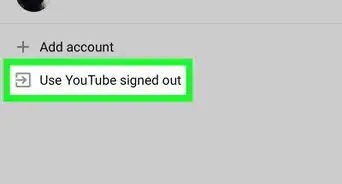
3Tap your Google account, or tap + Add account. If the Google account associated with your YouTube TV is listed at the log in screen, tap that account email to log in automatically. If you do not see your account listed, tap "+ Add account" and continue to the next step,
-
4Type your email address and tap Next. Use the email address of phone number associated with your YouTube TV subscription to log in to YouTube TV. Tap Next when you are finished.
-
5Type your password and tap Next. Type the password associated with your YouTube TV account and tap Next.
- If you have two-factor identification enabled, you may need to tap Yes on your mobile device in order to log in.





About This Article

1. Open YouTube TV.
2. Tap Already a member?
3. Tap your account, or tap + Add account.
4. Sign in with your email and password.