This article was written by Nicole Levine, MFA. Nicole Levine is a Technology Writer and Editor for wikiHow. She has more than 20 years of experience creating technical documentation and leading support teams at major web hosting and software companies. Nicole also holds an MFA in Creative Writing from Portland State University and teaches composition, fiction-writing, and zine-making at various institutions.
wikiHow marks an article as reader-approved once it receives enough positive feedback. This article received 14 testimonials and 86% of readers who voted found it helpful, earning it our reader-approved status.
This article has been viewed 3,134,317 times.
If you're having difficulty contacting someone on WhatsApp, the user may have blocked you. While there is no way to know for sure that you've been blocked (WhatsApp makes it intentionally vague for privacy reasons), there are some signs you can look for to confirm your suspicions. Keep in mind that WhatsApp allows people to disable features like "Last seen" and "Online" statuses—this means it's possible that someone you think has blocked you has actually just tightened their privacy.
Steps
-
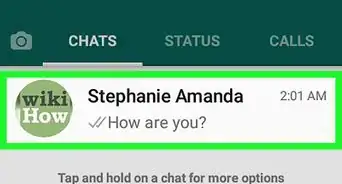
1Tap the Chats tab at the bottom of WhatsApp. It's at the bottom of the screen. This displays a list of your conversations.
-
2Tap the conversation with the person you think has blocked you. This opens a conversation with that user.
- Being able to view the conversation and send messages to another user doesn't mean they haven't blocked you.
-
3Check if the user is Online. If the user has WhatsApp open right now and you are not blocked, you'll see the word "Online" at the top of the conversation.[1] If you don't see "Online," it can mean one of two things: The person doesn't have WhatsApp open on their screen, or they have blocked you.
- Just because you don't see someone's online status doesn't mean they've blocked you—remember, WhatsApp keeps the signs of blocking pretty ambiguous to protect user privacy.
-
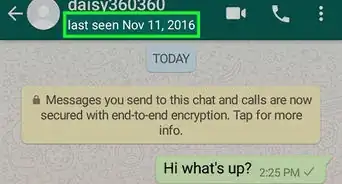
4Look for the Last Seen timestamp. If the user is not currently "Online," you'd usually see "Last Seen" at the top of the chat, along with the date and time they last opened the app. If you don't see this info, it could be because the user has disabled this feature for privacy purposes, or because they've blocked you.[2]
- If you have a mutual friend in common with this person, you could ask them whether they can see this person's Last Seen status (if you feel comfortable doing so). If the mutual friend can confirm that this user hasn't turned off the Last Seen feature, you've likely been blocked.
-
5Look for two checkmarks next to a sent message. When you send a message to a contact who has not blocked you, you will see two checkmarks to the right of the timestamp--one checkmark means the message has been sent, and the other means it has been delivered.[3] If the second checkmark never appears, you may have been blocked. However, you'd also only see one checkmark if the recipient's phone is out of service or if they've uninstalled the app.
-
6Look for profile changes. Tap the person's name at the conversation to view their profile. When you are blocked on WhatsApp, a user's profile will never change to you. If you have reason to believe that this user has changed their status or profile photo and you can't see the changes, you may have been blocked.
-
7Try calling the person in WhatsApp. Tapping the phone receiver icon at the top of a chat initiates a voice call to that user. If the call does not start ringing the user, it could mean they've blocked you. However, it could also mean that they've disabled voice calls in their privacy settings.


Community Q&A
-
QuestionIf I can see everything except the time stamp, have I been blocked?
 Community AnswerNo, it may also mean that they're just hiding the time stamp or it's only visible when they're online.
 -
QuestionCan I know what time and exact date the person has blocked me?
 Community AnswerNo. You can only know that they blocked you, but not the time.
 -
QuestionCan I see the profile picture of the person who blocked me?Community AnswerNo. Once you're blocked, you can't see a profile picture or status.
-
QuestionIf I can see the last seen but there remains one tick in the check mark, am I blocked by this person?Community AnswerNo, it means your message is taking a while because either the other person or you have a bad connection but you haven't been blocked.
-
QuestionHow do I block someone from WhatsApp?Community AnswerGo to your WhatsApp contacts, click on their name and scroll to the bottom of their page. In red it should say Block this Contact.
-
QuestionIf I am blocked, can I see that person in my contact list?
 Community AnswerYes, but you won't be able to see his or her status, profile photo, and last time stamp.
 -
QuestionWill I still able to see a contact's number if he or she blocked me?Community AnswerYes, as long as the number is still saved in your phone book.
-
QuestionHow can I unblock myself again?Community AnswerThe recipient (i.e. the person who's blocked you) has to unblock you, you can't do it manually.
-
QuestionWhat does it mean if my phone is connected but I get the "try again" message?Community AnswerYour phone is connected to the WiFi network. The uplink (connection to internet provider from the router) may be down.
-
QuestionIs it possible a person can read my messages in group but not in chatbox?Community AnswerIf someone blocked you, he can still see and receive your messages on a group chat, but not in chatbox.
References
About This Article

1. Tap Chats.
2. Tap a conversation with the user.
3. Check the "Online" or "Last Seen" status.
4. Look for 2 checkmarks next to a sent message.
5. Check for profile changes.
6. Try calling the user.