X
wikiHow is a “wiki,” similar to Wikipedia, which means that many of our articles are co-written by multiple authors. To create this article, volunteer authors worked to edit and improve it over time.
This article has been viewed 72,402 times.
Learn more...
Discord is a free way to communicate with people in games and many gamers use it. This set of instructions is to help you quickly and effectively get into a server and communicate with your team.
Steps
-
1Obtain a Discord link from emails, or in a game chat lobby. Copy the link.
-
2Open Discord, via the app, or webpage. If you do not have the app, open the Discord web page.
-
3Click on “Open Discord in your Browser".
-
4Input a username.
-
5After redirecting to the home page, look on the far-left side, you should see a plus sign inside a dotted circle. Note there may be a pop-up window asking to give you a tutorial of discord. Select skip and continue to the home page.
-
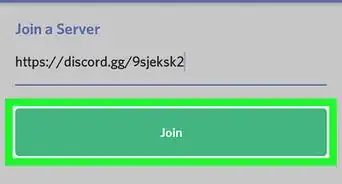
6Click on circle and select “join a server”. The option will be the right one).
-
7Paste the previously copied link into the search bar and click join. You've now joined the server!


Community Q&A
-
QuestionIf I am only given an ID, how do I join a server?
 Community AnswerYou can't. You need an invite link. You could visit discordbee.com if you are looking for discord servers.
 -
QuestionCan only the creator of the server delete it? Will someone with the Administrator role be able to delete it?
 HagukananTop AnswererOnly the creator of the server will be able to delete it. The creator will have a crown icon next to their username if you open the "members" tab within the server.