This article was written by Travis Boylls. Travis Boylls is a Technology Writer and Editor for wikiHow. Travis has experience writing technology-related articles, providing software customer service, and in graphic design. He specializes in Windows, macOS, Android, iOS, and Linux platforms. He studied graphic design at Pikes Peak Community College.
The wikiHow Tech Team also followed the article's instructions and verified that they work.
This article has been viewed 3,928 times.
This wikiHow teaches you how to cancel Xbox Live Gold on iPhone or iPad. XBox Live Gold is required to play multiplayer games online through XBox. You can't sign up for XBox Live Gold through the XBox app, but you can sign up through a web browser.
Steps
-
1Go to https://www.xbox.com/en-US/live/gold in a web browser. Using a mobile web browser, such as Safari, go to the Xbox Live Gold page.
-
2Tap Join Today. It's the green button below the large image that says "Gold".Advertisement
-
3Select a subscription plan in the drop-down box. Tap the pulldown menu that says "Xbox Live Gold 1 Month" and tap one of the following options:
- 1 month for $9.99.
- 3 months for $24.99.
- 12 months for $59.99.
-
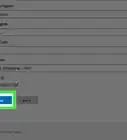
4Tap Join Now. It's the blue button underneath the drop-down menu.
-
5Sign in to your Microsoft account. Enter the email address and password associated with your Microsoft account and
-
6Verify your email address. Tap the box that contains your email address and then enter the matching email in the text box.
-
7Tap Send Code. This will send a verification code to your email address.
-
8Check your email for the verification code. An email containing a verification code should be sent to the email account associated with your Microsoft account. Make note of the verification code.
-
9Enter the code and tap Verify. Back on the Xbox website, type the verification code into the text box and tap "Verify" to submit it. This returns you to the subscription page.
-
10Tap Join now. It's the same blue button you tapped earlier, below the subscription drop-down box. This will display the default payment method of your Microsoft account.
- If you don't have a payment option saved with your Microsoft account, you'll be asked to provide payment information.
-
11Tap Subscribe. It's the blue button at the bottom of the payment screen. The credit card on your Xbox account will be charged and your subscription to XBox Live Gold will start immediately.Advertisement



About This Article

1. Go to https://www.xbox.com/en-US/live/gold
2. Tap Join Today.
3. Select a plan and tap Join now.
4. Sign in to your Microsoft account.
5. Enter your email address and tap Send Code.
6. Retrieve the verification code and tap Verify.
7. Tap Join now and then Subscribe.