This article was written by Nicole Levine, MFA. Nicole Levine is a Technology Writer and Editor for wikiHow. She has more than 20 years of experience creating technical documentation and leading support teams at major web hosting and software companies. Nicole also holds an MFA in Creative Writing from Portland State University and teaches composition, fiction-writing, and zine-making at various institutions.
This article has been viewed 325,810 times.
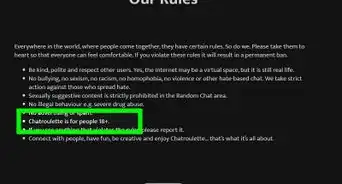
Chatroulette is an anonymous video chat site that's been around for nearly a decade. Though Chatroulette's official rules are no longer publicly linked on their website, it's possible that violating their community standards will result in your IP address being banned from the service. This wikiHow teaches you what to do if your IP address has been banned by Chatroulette.
Steps
Method 1
Method 1 of 2:Contacting Chatroulette Support
-
1Create a new email message to support@chatroulette.com. Although there's no guarantee that you'll be unbanned, you can attempt to plead your case by contacting someone at Chatroulette.[1]
- Chatroulette does not have a feedback form on its homepage or a separate email account for unbanning requests. All feedback for the chat site goes through this email address, so it might take a little while before the staff gets to your message.
-
2Explain why you deserve to be unbanned. In the body of the email, let the support team know that your IP was banned from the site and state why you believe the ban to be unfair.
- You have a better chance of getting the ban lifted if you were legitimately not in the wrong. Some claim that people hit the “Report” button whenever they see someone they do not want to see. For example, this might happen if a man wants to reduce the number of men he sees on the site, or if someone is paired with a user they find unattractive. If you suspect that you were banned for a reason like this, state that in the message.
- Regardless of the reason you were banned, your best bet is to apologize and promise to behave yourself in the future.
Advertisement -
3Include your external IP address in the email message. Chatroulette bans users by IP address, so they'll need to know yours in order to unban you. The fastest way to find your external IP address is to visit https://www.google.com and search for the phrase what is my IP address?.
-
4Wait for further instruction from Chatroulette. It could take hours, days, or weeks for Chatroulette to respond. In the meantime, continue checking the site to see if the ban has been lifted.
- Chatroulette is under no obligation to lift the ban or reply to your email, no matter how innocent you may be.
- If the ban is removed, Chatroulette may not notify you by email.
Advertisement


Method 2
Method 2 of 2:Getting Around a Ban
-
1Use a proxy server. A proxy server or site allows you to browse the web through a third-party server, thereby masking your own IP address. Though this will not technically unban you from Chatroulette, you can use a proxy to mask your IP address. Though many of these services might be slower than what you're used to, they may be fast enough to use as a temporary workaround.
- Some popular free proxy service options are VPNBook and FilterBypass.[2]
- Chatroulette may automatically block the IP addresses of certain proxy sites. You may have to try a few different proxies before finding one that works.
-
2Take your computer to a free Wi-Fi hotspot. Common options include coffee shops and libraries, but since these places are often packed with other people, video chatting will be rude and difficult to do. Search for something more private, like a private study room inside of a library.
-
3Try a VPN service. A VPN, or Virtual Private Network, is a network that allows you to access data from public networks, like the Internet, while maintaining the security of a private network. VPNs are similar to proxy servers except your connection will also be encrypted.[3] Most VPNs cost money, but the price is usually reasonable.
- Some popular VPN services are ExpressVPN, Norton Secure VPN, and NordVPN.[4]
-
4Change your IP address. This is usually not an easy task, as most home users' IP addresses are automatically assigned by the ISP. You may be able to force a new IP address to be assigned using the steps in this wikiHow. If not, you can try calling your ISP and request a new IP address be assigned.
- One way to try to get a new IP address is to unplug your modem for 5 minutes and then plug it back in. If that doesn't work, see if leaving the modem unplugged overnight gives you different results.
- You could also try calling your ISP to request a new IP address for your connection.
-
5Try a Chatroulette alternative. If you're just looking to video chat with new people, you can try using one of the many Chatroulette alternatives. Check out Omegle, Chatrandom, and Faceflow are just a few different options.Advertisement


-Step-8-Version-2.webp)





References
About This Article

1. Contact support@chatroulette.com.
2. Include your external IP address in the message.
3. Explain why you were wrongly banned.
4. Ask to be unbanned.
5. Send the message.
To learn how to use a proxy server to get unbanned from Chatroulette, keep reading!
-Step-8-Version-2.webp)