This article was written by Nicole Levine, MFA. Nicole Levine is a Technology Writer and Editor for wikiHow. She has more than 20 years of experience creating technical documentation and leading support teams at major web hosting and software companies. Nicole also holds an MFA in Creative Writing from Portland State University and teaches composition, fiction-writing, and zine-making at various institutions.
The wikiHow Tech Team also followed the article's instructions and verified that they work.
This article has been viewed 69,211 times.
This wikiHow teaches you how to find a Slack channel’s alphanumeric ID using your Mac or PC.
Steps
-
1Go to your Slack team’s URL in a web browser. The URL follows the format of yourteamname.slack.com, but replace “yourteamname” with your actual team’s name.
- If you’re not already signed in to your team, you should do so now.
-
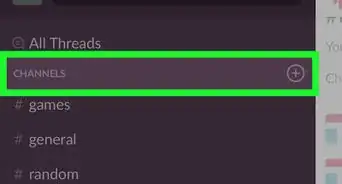
2Click the channel. Channels appear under the “Channels” heading in the left column.Advertisement
-
3Find the channel ID in the address bar between /messages/ and /team/. This is the bar at the top of your browser that displays the current website’s URL. The channel ID contains nine characters that can be both letters and numbers.Advertisement










About This Article

1. Go to your team's URL.
2. Click the channel.
3. Find the ID between /messages/ and /team/.