X
wikiHow is a “wiki,” similar to Wikipedia, which means that many of our articles are co-written by multiple authors. To create this article, 18 people, some anonymous, worked to edit and improve it over time.
This article has been viewed 75,190 times.
Learn more...
Random access memory (RAM) is the best known form of computer memory. RAM is considered "random access" because you can access any memory cell directly if you know the row and column that intersect at that cell.
Steps
Method 1
Method 1 of 3:Command Line
Method 1


Method 2
Method 2 of 3:Expanded Text Form
Method 2


Method 3
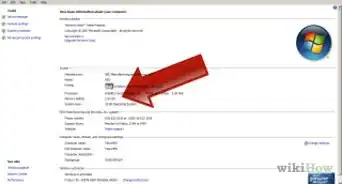
Method 3 of 3:Windows 7 Graphic User Interface
Method 3


Community Q&A
-
QuestionHow do I increase the RAM in a Lenovo PC?
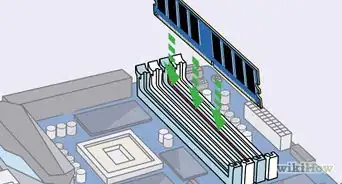
 Community AnswerOpen the side panel that lets you see the motherboard. The RAM is the small stick piece with clips on each of the short ends. If there are more slots that do not have RAM in them, you can increase the RAM. If the RAM in those slots isn't the maximum size that the motherboard can handle, you can replace that stick with one of a larger size.
Warnings
- PC can only hold a limited amount of RAM depending on your Operating System and MotherboardThanks!
- 32 bit version of Windows can only support a maximum of 4 gigabytes, If you wish to use more than that then you will have to upgrade to a 64 bit operating system.Thanks!
- When viewing the amount of RAM you have please note that it will always be short of what is actually installed.Thanks!






References
- http://windows.microsoft.com/en-au/windows/how-much-computer-ram#1TC=windows-7
- http://www.howtogeek.com/175434/how-can-i-check-my-computers-ram-configuration-without-opening-the-case/
- http://superuser.com/questions/650208/how-to-check-my-ram-configuration-windows-7
- http://www.howtogeek.com/131632/hardware-upgrade-why-windows-cant-see-all-your-ram/