Explore this Article
methods
Other Sections
X
wikiHow is a “wiki,” similar to Wikipedia, which means that many of our articles are co-written by multiple authors. To create this article, volunteer authors worked to edit and improve it over time.
This article has been viewed 2,879 times.
Learn more...
For those wanting to know how to factory reset your PlayStation 4 here are the simple steps to doing so!
Steps
Method 1
Method 1 of 2:Logging Out and Back In
Method 1
-
1Sign in to your PlayStation 4 and go to the Settings tab.
-
2Go to Account Management. Select "Activate as Your Primary PS4" and choose "Deactivate".
-
3Sign back into your account.
-
4Go to Initialization under settings, and choose "Initialize PS4".
-
5Choose "Full" on the Initialize Screen.
- Your PlayStation 4 should be reset to its factory settings.


Method 2
Method 2 of 2:Factory Resetting your PS4 from Safe Mode
Method 2
-
1Turn off your PlayStation 4 completely. To do this, hold down the power button until you hear two beeps.
-
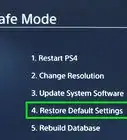
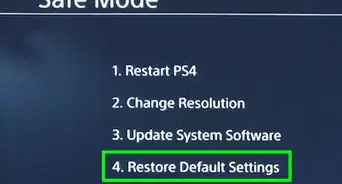
2Turn your PlayStation 4 back on, but when doing so, hold the power button until you hear two beeps and it brings up the Safe Mode screen.
-
3Choose the Reset option.
-
4Choose "Initialize PS4" if you are not having issues with your software.


You Might Also Like
 2 Easy Ways to Fix No Signal on a PS4 (HDMI and Resolution Fix)
How to
See Hours Played on PS4
How to
Connect a PS4 to a Laptop
How to
Delete a User on PS4
How to
Increase PlayStation 4 Download Speed
How to
Clean a PS4 Disc
How to
Clean a PS4 Controller

How to
Clean a PlayStation 4
How to
Hook Up a PlayStation 4 to a TV
How to
Use PS4 Second Screen

How to
Locate Saved Videos and Screenshots on Your PlayStation 4
How to
Update System Software on PS4

How to
Turn a PlayStation 4 on
How to
Install PS4 System Updates without an Internet Connection
About This Article
wikiHow is a “wiki,” similar to Wikipedia, which means that many of our articles are co-written by multiple authors. To create this article, volunteer authors worked to edit and improve it over time. This article has been viewed 2,879 times.
1 votes - 20%
Co-authors: 5
Updated: February 20, 2020
Views: 2,879
Categories: PlayStation 4