This article was co-authored by wikiHow Staff. Our trained team of editors and researchers validate articles for accuracy and comprehensiveness. wikiHow's Content Management Team carefully monitors the work from our editorial staff to ensure that each article is backed by trusted research and meets our high quality standards.
The wikiHow Tech Team also followed the article's instructions and verified that they work.
This article has been viewed 30,444 times.
Learn more...
This wikiHow teaches you to boot your Android smartphone in recovery mode.
Steps
-
1Press and hold the Power button.
-
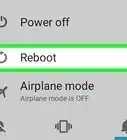
2Tap Power Off. Depending on your device and version of Android, you may need to tap "Power Off" again to confirm.
- If the touchscreen is unresponsive, you can hold the power key until the device shuts down.
-
3Press and hold the Recovery Mode button combination. For most phones, this is the Power button and the Volume Down button, but every phone is different. Other common button combinations are:[1]
- Nexus devices - Volume Up, Volume Down, and Power
- Samsung devices - Volume Up, Home, and Power
- Moto X - Volume Down, Home, and Power
- Other devices generally use Volume Down and Power. Some devices with physical user interfaces may use the Power and Home buttons.
-
4Wait for the Android logo to appear. Typically, it's an image of an Android on its back and is usually the same logo you see when installing a system update.
-
5Use the Volume Up and Volume Down buttons to navigate the menu.
-
6Press the Power button to make a selection.
- Some devices have a menu that precedes Recovery Mode. In such an instance, use the Volume buttons to select "Recovery Mode" and press the Power button.


Community Q&A
-
QuestionMy HTC is not responding when I switch it on. It only shows the HTC logo on the screen but does not move past that even after rebooting.
 JackfergCommunity AnswerIs it fully charged? If the logo is showing but then it turns off, this could be a sign of a dead battery.
 -
QuestionHow to unlock my fastboot mode on my phone?
 Dan BCommunity AnswerIt depends on what kind of phone you are using. For most phones, press down the power button together with either the up or down volume key. For other phones with the home button, the power button is pressed together with the home button for some few seconds.
 -
QuestionHow to go to recovery settings?
 Community AnswerTry pressing the power button and down volume. Most of the time this works but it varies between phone models and manufacturers.
 -
QuestionHow to get a tablet to recovery mode?
 Peter MissickCommunity AnswerPress the Volume Up and Volume Down keys to scroll through the options until you see Recovery mode on the screen. Press the Power button to restart into recovery mode. You'll soon see an Android with a red triangle.
 -
QuestionHow I can Boot recovery techno s1 Android 6.0?
 Jamilu Kabir SabeCommunity AnswerTurn off the phone (make sure it is off completely). Then press the power and the volume keys together at the same time.














About This Article

1. Press and hold the Power button.
2. Tap Power Off.
3. Press and hold the Recovery Mode button combination.
4. Wait for the Android logo to appear.
5. Use Volume Up and Volume Down to navigate.
6. Press the Power button to make a selection.