X
wikiHow is a “wiki,” similar to Wikipedia, which means that many of our articles are co-written by multiple authors. To create this article, 12 people, some anonymous, worked to edit and improve it over time.
This article has been viewed 73,500 times.
Learn more...
Digital audio editing technology has created many ways to edit audio. While professional studios use specialized equipment such as studio microphones and mixing boards to create sounds of higher quality, basic editing can be done quite easily with just a virtual studio installed on a home computer. The basic features of the sound editing software remain the same.
Steps
Method 1
Method 1 of 5:Installing Sound Studio Software
Method 1
-
1Install a software that can edit sound on your computer. You can purchase a CD or download the program from the Internet and just follow the steps in the installation guide for that program. There are many programs available but here are some of the popular ones that you may want to choose from.
- Audacity: an open source software that can record and edit multiple tracks. It also has a very effective noise removal function to remove hissing, static and humming by simply selecting a sample of the noise and then removing it from the whole track.
- Power Sound Editor: can record and change tracks that need to be mixed with other parts of a musical composition. You can also alter the audio data by adding time-shifting effects such as Echo, Chorus and Reverb. Power Sound Editor allows you to easily share your edited audios over the Internet or through email. You can also burn finalized files onto a CD.
- Mp3DirectCut: specializes in recording and editing MP3 files. This file format is ideal for someone who wants to compress files to smaller sizes.
- Wavosaur: specializes in capturing and processing WAV files. It offers real-time effects so you can hear what the effects sound like while you are recording the audio. Wavosaur also supports MP3 format.

Method 2
Method 2 of 5:Recording Features
Method 2
-
1Record audio by connecting a microphone as the input device on your computer (almost all computers have a microphone in port). You can do advanced recording using the following features.
- Record on multi-tracks if you have a computer with more than 1 microphone port.
- Dub over other tracks by recording a new track while the tracks that have already been recorded play in the background.

Method 3
Method 3 of 5:Transferring Audio Files
Method 3

Method 4
Method 4 of 5:Editing Features
Method 4
-
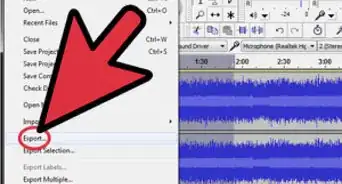
1Edit recorded or transferred audio files using an audio editing software. Every software has its own unique set of features to edit audio but here are the most common ones.
- Copy and paste parts of a track to rearrange the composition.
- Delete unwanted tracks or parts of a track.
- Mix tracks together by adjusting volume levels of tracks individually.

Method 5
Method 5 of 5:Using Effects
Method 5
-
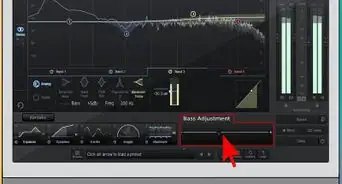
1Add digital effects to your audio tracks to enhance the sound of the instruments or vocals. Most virtual studio software offers the following effects.
- Pitch change: to give the track a higher or lower pitch.
- Noise reduction or removal: this reduces or removes hissing and other unwanted background noise.
- Echo, Flanger, Delay and other similar effects that repeat or shift the time of notes to make them sound fuller.

Community Q&A
-
QuestionHow can I fix an audio recording that has too much background noise without affecting vocals?
 Community AnswerTo do that in Audacity specifically, you have to select a part of the video where you don't speak, then go to "Effect." Next choose "Noise reduction," and click "Get noise profile." Then you use CTRL+A to select all of the recording, and go again into "Noise reduction" and click "OK." Be sure you have selected "Reduce."
 -
QuestionHow can I choose one section of a voice recording file?
 Community AnswerIf you want to keep the track you're working on unchanged, you select the section you need to extract, then you go to Edit--> Copy and open a new file in File. Then paste that file in.
 -
QuestionHow do I remove the noise that sounds like somebody is walking on plastic, and how do I fix voices that are too close to the microphone?
 Matthew WeilCommunity AnswerYou either have to resize the length of the microphone to reach a point, or you have to record while they are away.
 -
QuestionHow do I play an existing audio file and record voice along with it so that I have a new audio with my vocals and the background track?
 TuLuzCommunity AnswerYou can try using screencasting software that allows you to record sound from multiple sources simultaneously. Some of the programs are Movavi Screen Capture Studio, My Screen Recorder, Debut, and others.
 -
QuestionCan I copy a part of an audio file and place it next to the original so that it's repeated?
 Community AnswerYou can - I’ve done this in Audacity before when creating a custom ringtone.