This article was co-authored by Alex Keller. Alex Keller has been playing The Sims for over six years, and has contributed extensively to wikiHow's Sims topics. He plays The Sims 1, The Sims 2, The Sims 3, and The Sims 4 on Windows 10 and macOS.
This article has been viewed 103,187 times.
Many Sims 4 players want to be able to further customize their games, whether in Create-a-Sim or while building lots. User-created custom content will bring new items into your game, but it's easy to get lost in the process of downloading it. This wikiHow will teach you how to install custom content on The Sims 4.
Steps
-
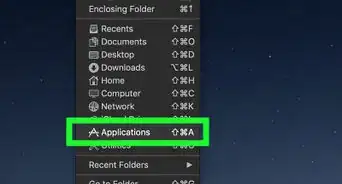
1Find your Mods folder. Close out your game and open File Explorer (on Windows) or Finder (on Mac). Your Mods folder, if you installed your game in the default location, will be in
[User] > Documents > Electronic Arts > The Sims 4 > Mods.- There will be a file called
Resource.cfgin the Mods folder. Do not delete this file; if you do, your custom content won't show up.
Tip: Custom Sims and lots don't go in the Mods folder. These will be placed in
The Sims 4 > Trayinstead. - There will be a file called
-
2Download a program such as 7-Zip or The Unarchiver. A lot of custom content is compressed into .rar or .zip files, which you'll need to extract before you can place the files into your game.Advertisement
-
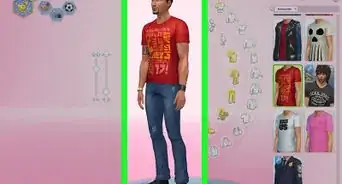
3Search around for Sims 4 custom content. You can usually find some content sites by using a search engine. Some popular custom content websites include Mod The Sims and The Sims Resource, and many people also share Sims 4 custom content on blogs such as Tumblr.
- Many sites allow you to drill down to specific content categories (such as makeup or study furniture). You can also search for specific types of content on search engines, like "sims 4 custom hairstyles".
- If you're looking for good CC creators, try asking for people's favorite creators on Sims 4 forums or social media sites. You may get some great recommendations!
Tip: Install an adblocker (such as uBlock Origin or Adblock Plus) before visiting any custom content websites. Some sites host misleading or malicious ads that will try to put malware on your computer.
-
4Look for any needed requirements. Some custom content requires you to have something else for the content to work, such as a game pack or a mesh, and other content may not work with certain game patches. Creators usually write what's needed in the content descriptions, so make sure to read the description first!
- Some sites such as Mod The Sims allow you to filter out content that requires game packs that you don't have, or display icons of the game packs necessary for the content.
- Make sure the content is for Sims 4 before you download it. Content for Sims 3 and Sims 2 also come in .package files, but putting Sims 3 or Sims 2 files in your game won't work and will cause the game to run slowly.
-
5Find the download link or button for the content. Dedicated custom content websites will usually have a "Download" button on the page. If the content is located on a blog or other site that's not dedicated to Sims content, you'll usually need to find the link to the download site. (Most independent creators host their files on websites like Sim File Share, Box, OneDrive, or MediaFire.)
- The Sims Resource will make you wait ten seconds before proceeding, unless you pay for VIP membership. If you try to skip these ten seconds, it will redirect you to a page for Sims 4 downloads, so stay on the same tab for ten seconds.
- Some downloads make you wait in adFly for 5 seconds. Don't click on any of the ads, as a lot of them are viruses. When a "Skip" button appears in the right hand corner, click it and find the download link for the custom content.
-
6Extract the file if it's a .rar or .zip file. If the custom content is in a .rar or .zip file, you'll need to extract the contents first. (The content needs to be in .package format; placing .rar or .zip files into your Mods folder won't work.)
- On Windows: Right-click the file. If it's a .zip file, choose Extract to /*; if it's a .rar file, find the option for your decompression program (such as 7-Zip) and choose Extract or Extract to /*.
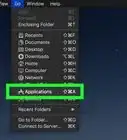
- On Mac: Either double-click the file, or right-click it and select Open with... > The Unarchiver.
- Once the content has been extracted, you can delete the .rar or .zip file.
Tip: Don't extract a bunch of files at once. Sometimes files aren't sorted into folders, and extracting a lot of files at once can result in a disorganized mess that's hard to clean up.
-
7Move the custom content to your Mods folder. Select the .package files. Either drag-and-drop them into The Sims 4 > Mods, or right-click them, click Cut, go to the Mods folder, and click Paste.
- You might want to organize your content into subfolders so that you can distinguish content from each other. (Be aware that script mods cannot be put into subfolders.)
-
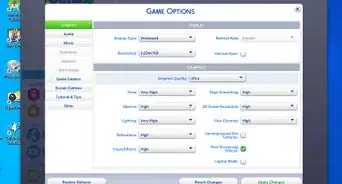
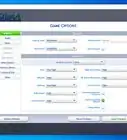
8Enable custom content in-game, if necessary. If your game doesn't automatically enable mods, open Settings and click Other. Check the boxes that say "Enable Custom Content and Mods" and "Script Mods Allowed", and click Apply Changes to enable them.
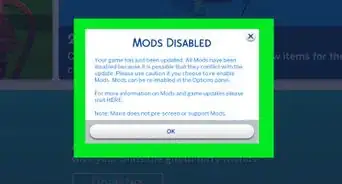
Tip: Game patches will automatically disable all custom content or mods in case the mods are no longer compatible.
Advertisement


Community Q&A
-
QuestionDo I need to pay for custom content?
 GamingWithTemmieCommunity AnswerNo, the Sims resource, Tumblr and Pinterest are all websites to get free CC from.
 -
QuestionCan I get custom content on a Levono laptop?
 Community AnswerYes. You should be able to get custom content on any type of computer as long as you have the Sims 4.
 -
QuestionWill this work on a Mac computer?GamingWithTemmieCommunity AnswerYes, it should, but it won't handle as much CC as a more powerful computer would.
-
QuestionIs WinRAR the only program I can use?
 AnimebreadTop AnswererThere are numerous other programs that can unpack RAR files, such as 7-Zip, WinZip, Hamster Zip Archiver, and many more.
 -
QuestionHow do I download without the winrar?
 Megm26Community AnswerIf you have a Windows computer, you can open .zip files without winrar. For .rar files, you need winrar.
 -
QuestionIt said my computer could not open the resource.cfg. What should I do? Also, how do I download Winrar on a Windows computer?Megm26Community AnswerYou do not need to open resource.cfg, and you can go to Winrar's website and it will show you how to download.
-
QuestionWhat about if I'm playing Sims 4 on the Xbox One?
 Community AnswerWe don't get mods or custom content, unfortunately. They're only available for the computer version.
 -
QuestionWhat should I do if I deleted my resource file?Megm26Community AnswerYou can download another one by searching resource.cfg on Google. The first link will get you one and you can pop it in your mods folder.
-
QuestionWill custom content ruin my Lenovo laptop?AnimebreadTop AnswererNo, it's generally safe, but always be careful where you are downloading from. Try and download from trusted and well-known websites. Be sure to know how much your laptop can handle, as laptops tend to lag more with the Sims 4 than a desktop computer. You can download a little bit at a time and check to ensure your gaming is still running smoothly.
-
QuestionWhat if I don't have an EA folder in my Documents folder?
 AlexTop AnswererMake sure your game folder didn't generate in the wrong location. If you have OneDrive or iCloud enabled on your computer, check there to make sure your game files aren't located on the cloud drive. (To find where your game is located, launch the game, go to Options, and click "Screen Capture" - the directory in "Location Path" shows where your files are located.) If you've just installed the game, you'll also need to start your game at least once to generate the game folder.