X
wikiHow is a “wiki,” similar to Wikipedia, which means that many of our articles are co-written by multiple authors. To create this article, 9 people, some anonymous, worked to edit and improve it over time.
This article has been viewed 23,143 times.
Learn more...
Suppose you have designed a 3D model on AutoCAD or some other 3D model maker and you want to display it on your webpage without losing or compromising its 3D interactivity. This article will give you some options to do so.
Steps
Method 1
Method 1 of 2:Using Javascript Framework jsc3d
Method 1
-
1Note that jsc3d is a javascript framework that provides a 3D object viewer for webpages. It is coded entirely in javascript and requires an HTML canvas to perform rendering and interactions. It provides orthographic view .
-
2Download the jsc3d zip file from Google. The link is: http://code.google.com/p/jsc3d/.Advertisement
-
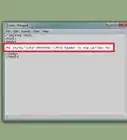
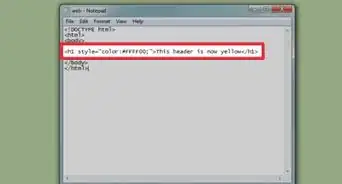
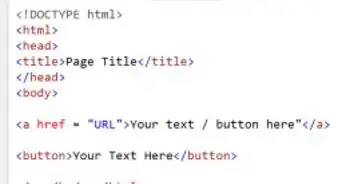
3Use the code shown in the figure. Write the file path name as needed in place of the dark-red highlighted text. Ensure that your file format is .obj or otherwise convert it to .obj.
-
4Make sure that you meet the requirements:
- Javascript enabled browser
- HTML 5 support
- Canvas support.
Advertisement


Method 2
Method 2 of 2:Using Third Parties
Method 2
-
1Choose a service. There are various websites which provide 3D object viewing.
-
2Use the link they give you. With most of these services, you can submit your 3d file and get a link which you can embed on your webpage.
- For example, with sketchfab.com you'll get a link like this:
<iframe width="640" height="480" frameborder="0" allowFullScreen webkitallowfullscreen mozallowfullscreen src="https://sketchfab.com/models/2f145c2ba8164bc6b7083f80617eb7fc/embed"></iframe>

<p style="font-size: 13px; font-weight: normal; margin: 5px; color: #4A4A4A;">
    <a href="https://sketchfab.com/models/2f145c2ba8164bc6b7083f80617eb7fc" style="font-weight: bold; color: #1CAAD9;">Wikihow3d</a>
    by <a href="https://sketchfab.com/lal.abhishek" style="font-weight: bold; color: #1CAAD9;">lal.abhishek</a>
    on <a href="https://sketchfab.com" style="font-weight: bold; color: #1CAAD9;">Sketchfab</a>
</p>
- For example, with sketchfab.com you'll get a link like this:
-
3Visit here to see a demo on how it should look.Advertisement








-Step-12-Version-2.webp)
About This Article
Advertisement