X
wikiHow is a “wiki,” similar to Wikipedia, which means that many of our articles are co-written by multiple authors. To create this article, volunteer authors worked to edit and improve it over time.
This article has been viewed 21,033 times.
Learn more...
Old and new forums alike are susceptible to spammers that can impede on the collaborating environment. Deleting a user in a phpBB forum is surprisingly easy and can be done with a minimum of trouble. Read on to find out how.
Steps
-
1Log onto your phpBB forum as an administrator.
-
2Locate the link to the Administrator Control Panel (ACP) and click on it.
-
3Re-log in. Log in, again, with the same information as an admin.
-
4Click on Manage users on the left side of the screen (usually). Depending on your forum theme, of course.
-
5Get their name. If you know the name, type it in, if not, click on Find a member.
-
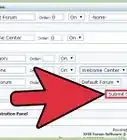
6Scroll down to the bottom of the screen. You will see a list of the current members. Click on Select and Submit.
-
7Find Quick Tools: At the very least, you will want to ban them by username. You might also want to ban them by IP.
-
8Go to Delete users and then choose if you want to delete their posts as well and then choose Submit.