X
This article was written by Nicole Levine, MFA. Nicole Levine is a Technology Writer and Editor for wikiHow. She has more than 20 years of experience creating technical documentation and leading support teams at major web hosting and software companies. Nicole also holds an MFA in Creative Writing from Portland State University and teaches composition, fiction-writing, and zine-making at various institutions.
This article has been viewed 10,376 times.
This wikiHow teaches you how to delete one or more rows from a spreadsheet in Microsoft Excel.
Steps
Method 1
Method 1 of 2:Deleting One Row
Method 1


Method 2
Method 2 of 2:Deleting Multiple Rows
Method 2
-
1Open the spreadsheet in Microsoft Excel. You can do this by double-clicking the file on your computer.
-
2Click and hold a cell in the first row you want to delete. Any cell in the row is fine.
-
3Drag the mouse down to the last row you want to delete. You should now have cells highlighted in every row you want to delete.
-
4Right-click any of the selected cells. A menu will appear.
-
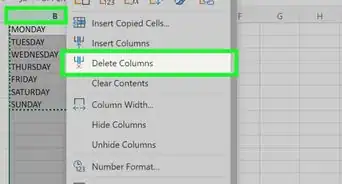
5Click Delete….
-
6Click Entire Row. The selected rows will all be deleted.[1]










References
About This Article

Nicole Levine, MFA
Tech Specialist
This article was written by Nicole Levine, MFA. Nicole Levine is a Technology Writer and Editor for wikiHow. She has more than 20 years of experience creating technical documentation and leading support teams at major web hosting and software companies. Nicole also holds an MFA in Creative Writing from Portland State University and teaches composition, fiction-writing, and zine-making at various institutions. This article has been viewed 10,376 times.
How helpful is this?
Co-authors: 1
Updated: March 29, 2019
Views: 10,376
Categories: Microsoft Excel