This article was written by Darlene Antonelli, MA. Darlene Antonelli is a Technology Writer and Editor for wikiHow. Darlene has experience teaching college courses, writing technology-related articles, and working hands-on in the technology field. She earned an MA in Writing from Rowan University in 2012 and wrote her thesis on online communities and the personalities curated in such communities.
This article has been viewed 1,502 times.
This wikiHow teaches you how to delete a Bumble account using the mobile app. Deleting a Bumble account will not end the subscription, so you will continue to be charged until you cancel your subscription.
Steps
-
1Open Bumble. This app icon looks like a yellow pentagon with horizontal lines inside that you'll find on one of your Home screens, in the app drawer, or by searching.
- All iPhones, iPads, and Androids function similarly in the mobile app.
-
2Tap your profile icon. It's in the top left corner of your screen.Advertisement
-
3
-
4Tap Delete Account. This is the last option at the bottom of the menu.
-
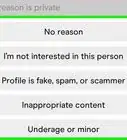
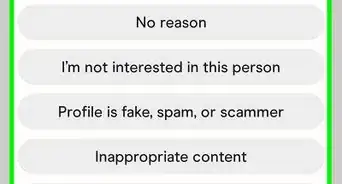
5Select your reason for deleting your account, type "Delete," and tap Confirm. You need to enter "Delete" without typos to be able to completely delete your account.[1]
- You can activate Snooze if you don't want to delete your account. If you activate Snooze, your profile won't appear to others in their matches, but your account will remain intact. Tap Snooze mode from the Settings menu and select how long you want to keep Snooze enabled.
- If you pay for a Bumble subscription, you'll need to cancel it to avoid being charged again. See How to Cancel a Bumble Subscription to learn how.
Advertisement








About This Article

1. Open Bumble.
2. Tap your profile icon.
3. Tap Settings.
4. Tap Delete Account.
5. Select your reason for deleting your account, type "Delete," and tap Confirm.