X
This article was written by Nicole Levine, MFA. Nicole Levine is a Technology Writer and Editor for wikiHow. She has more than 20 years of experience creating technical documentation and leading support teams at major web hosting and software companies. Nicole also holds an MFA in Creative Writing from Portland State University and teaches composition, fiction-writing, and zine-making at various institutions.
This article has been viewed 3,888 times.
This wikiHow teaches you how to count how to use Microsoft Excel to find out how many times a word appears in a range, as well as how to count the number of words in a single cell.
Steps
Method 1
Method 1 of 2:Counting Instances of a Word in a Range
Method 1
-
1
-
2Open the workbook you want to use. Press Control+O, select the file you want to access, then click Open.
-
3Click an empty cell. This is where you’ll enter the formula.
-
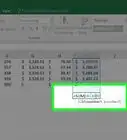
4Type the formula for counting the number of times a word occurs in a range. The format is =SUMPRODUCT(LEN(A2:A7)-LEN(SUBSTITUTE(A2:A7,"apple","")))/LEN("apple"). You’ll need to make the following modifications:
- Replace both instances of “A2:A7” with the range you want to evaluate.
- Replace both instances of “apple” with the word you’re counting.
-
5Press ↵ Enter or ⏎ Return. The number of times the word shows up in this range now appears in the cell.


Method 2
Method 2 of 2:Counting Words in a Cell
Method 2
-
1
-
2Open the workbook you want to use. Press Control+O, select the file you want to access, then click Open.
-
3Click an empty cell. This is where you’ll enter the formula.
-
4Type the formula for counting the number of words in a cell. The format is =IF(LEN(TRIM(cell))=0,0,LEN(TRIM(cell))-LEN(SUBSTITUTE(cell," ",""))+1). You’ll need to make the following modification:
- Replace all three instances of “cell” with the cell number you’re counting.
- For example, if you’re counting the words in A2, replace “cell” with A2 in the formula.
-
5Press ↵ Enter or ⏎ Return. The number of words in the selected cell now appears in place of the formula.




About This Article

Nicole Levine, MFA
Tech Specialist
This article was written by Nicole Levine, MFA. Nicole Levine is a Technology Writer and Editor for wikiHow. She has more than 20 years of experience creating technical documentation and leading support teams at major web hosting and software companies. Nicole also holds an MFA in Creative Writing from Portland State University and teaches composition, fiction-writing, and zine-making at various institutions. This article has been viewed 3,888 times.
How helpful is this?
Co-authors: 1
Updated: March 12, 2018
Views: 3,888
Categories: Microsoft Excel