X
This article was co-authored by wikiHow Staff. Our trained team of editors and researchers validate articles for accuracy and comprehensiveness. wikiHow's Content Management Team carefully monitors the work from our editorial staff to ensure that each article is backed by trusted research and meets our high quality standards.
This article has been viewed 193,539 times.
Learn more...
This wikiHow teaches you how to convert a WordPerfect document (*.wpd) to the Microsoft Word (*.docx) format.
Steps
Method 1
Method 1 of 2:Using an Online File Converter
Method 1
-
1Go to https://document.online-convert.com/convert-to-docx in a web browser. This is a free tool called Online Convert, which you can use to convert a WordPerfect document (and various other types of files) to the Microsoft Word .docx format.
- There are many different options for file converters online. If you don't want to use this one, you can search for "WPD to DOCX converter." The steps on other converters should be similar.
-
2Click Choose Files. It's in the green box at the center of the screen.Advertisement
-
3Select the WordPerfect document and click Open. This uploads the file to the converter.
-
4Click Start conversion. It's below the green box. The file will now be converted. Once the process is complete, a download button will appear.
- Depending on your computer, the Save or Save As window may automatically pop up.
-
5Click Download if the Save window didn't appear. It's the green button under the "Your converted file" header.
-
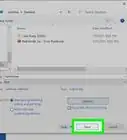
6Open the folder to which you want to save your file.
-
7Click Save. The converted file will now download to your computer.Advertisement


Method 2
Method 2 of 2:Using Microsoft Word
Method 2
-
1Open Microsoft Word on your computer. You'll find it under Microsoft Office in the Windows Start menu (PC) or in the 'Applications folder (macOS).[1]
-
2Click the File menu and select Open. This menu is at the top-left corner of Word.
-
3Browse for the document you want to convert. The steps to do this vary depending on your version of Word. Usually you'll have to click Browse and then open the folder that contains your WordPerfect document.
- WordPerfect documents end with .wpd or .doc, depending on the version.
-
4Select the document and click Open. This opens the WordPerfect file in Microsoft Word.
-
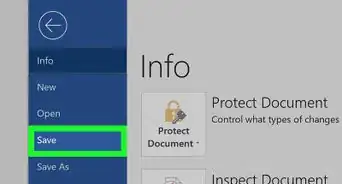
5Click the File menu and select Save As. If this doesn't open the "Save" or "Save As" dialog box, you'll probably have to click Browse first.
-
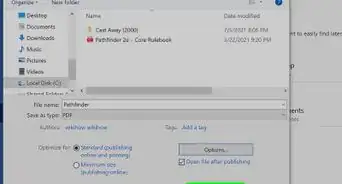
6Open the folder in which you want to save the file. You can save it anywhere you wish.
-
7Select Word document as the file type. You can do this by clicking the drop-down menu next to "Save as type" or "File format" and selecting Word document (*.docx).
-
8Click Save. This document will now be saved as a new Word document, ending with the ".docx" file extension.Advertisement


Community Q&A
-
QuestionHow do I make sure a MS Word document is saved?
 Community AnswerYou can press the save button again once you do the procedures needed for a save. If nothing happens when you press save, you are finished!







About This Article

wikiHow Staff
wikiHow Staff Writer
This article was co-authored by wikiHow Staff. Our trained team of editors and researchers validate articles for accuracy and comprehensiveness. wikiHow's Content Management Team carefully monitors the work from our editorial staff to ensure that each article is backed by trusted research and meets our high quality standards. This article has been viewed 193,539 times.
How helpful is this?
Co-authors: 6
Updated: April 8, 2021
Views: 193,539
Categories: Microsoft Word
Advertisement