This article was co-authored by wikiHow Staff. Our trained team of editors and researchers validate articles for accuracy and comprehensiveness. wikiHow's Content Management Team carefully monitors the work from our editorial staff to ensure that each article is backed by trusted research and meets our high quality standards.
This article has been viewed 7,866 times.
Learn more...
This wikiHow teaches you how to upload an SWF (Small Web Format) Flash animation to Convertio, and download an MP4 version of the same video file to your computer, using a desktop internet browser.
Steps
-
1Open an internet browser on your computer. You can use any browser like Firefox, Chrome, Safari or Opera.
-
2Go to the Convertio website in your browser. Type www.convertio.co into your browser's address bar, and hit ↵ Enter or ⏎ Return on your keyboard.
- Convertio is a free, online tool that allows you to convert various types of files, including SWF and MP4.
- You can easily find other online converters with a Google search. Most file converter websites work in a similar way.
Advertisement -
3Drag and drop your SWF file to the Convertio page. Find the file you want to convert on your computer, and drag it to the file converter page in your internet browser. This will upload the file to the converter.
- Alternatively, you can click the red From Computer button on the converter page. This will open a file explorer window, and let you upload your file manually.
- You can also upload a file from your cloud account by clicking the Dropbox or Google Drive icon next to the red button.
-
4Click the output format drop-down next to your file. You'll find this menu next to "to" on the right-hand side of the uploaded files list on the converter page.
-
5Hover over VIDEO on the drop-down menu. This will open a list of all the available video formats.
-
6Select MP4 as your output format. This will convert your SWF Flash animation to an MP4 video file.
-
7Click the red Convert button at the bottom. This will upload your SWF file to the converter, and convert it to MP4.
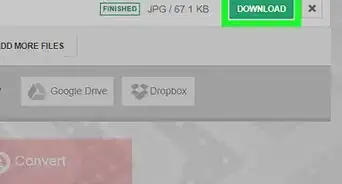
- You'll see a green FINISHED label next to your file when your conversion is finished, and your file is ready for download.
-
8Click the green DOWNLOAD button. You can find this button next to your file on the right-hand side of the list. It will download your converted MP4 video to your browser's default folder for downloads.
- If you don't have a default folder set for your browser downloads, you'll be prompted to select a saving location.
Advertisement





About This Article

1. Open Convertio in a browser.
2. Drag and drop your SWF to the converter page.
3. Click the output format drop-down, hover over VIDEO, and select MP4.
4. Click Convert at the bottom.
5. Click DOWNLOAD next to your file.