wikiHow is a “wiki,” similar to Wikipedia, which means that many of our articles are co-written by multiple authors. To create this article, 13 people, some anonymous, worked to edit and improve it over time.
The wikiHow Tech Team also followed the article's instructions and verified that they work.
This article has been viewed 47,537 times.
Learn more...
Skype is a free instant messaging and VoIP (Voice over Internet Protocol) voice and video-calling application that allows users to place calls over the internet without the need of a traditional landline or phone plan. Skype users can communicate with one another completely free, while placing calls to traditional landlines and mobile devices will require you to purchase Skype credits. This article will teach you how to change the email address associated with your Skype account.
Steps
-
1Go to the Skype my account sign in page and sign in using the Skype name and password associated with your account.
-
2On your homepage, find "Edit profile" on the lefthand side.
-
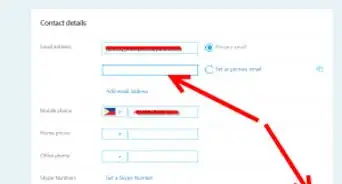
3Scroll down to "Contact details" and click "Edit profile".
-
4Change your e-mail and then click "Save".


Warnings
- If your Skype email address is the same one used on Outlook.com and other Microsoft accounts, your email change will apply across platforms.Thanks!