X
wikiHow is a “wiki,” similar to Wikipedia, which means that many of our articles are co-written by multiple authors. To create this article, 13 people, some anonymous, worked to edit and improve it over time.
The wikiHow Tech Team also followed the article's instructions and verified that they work.
This article has been viewed 162,410 times.
Learn more...
Your friend just gave you a disk of some of some of their favorite music and they want you to enjoy it as well. You rip the disk but now that you play the song there is no album artwork. This article will show you how to get album artwork.
Steps
-
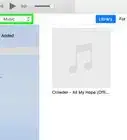
1First of all go to iTunes and find the album that does not have artwork.
-
2Next click on the first song then hold down shift and click the last song that will highlight all of the songs in the list.Advertisement
-
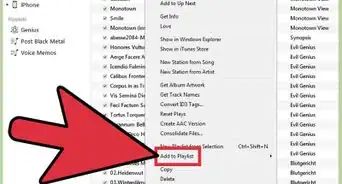
3Now right click and a list of options will show up.
-
4Click on the "Get album artwork".
-
5A little blurb will appear telling you that songs with missing artwork will be sent to apple.
-
6Just click Get album artwork.
-
7Now if you are lucky you will get the artwork if you are not you will need to manually insert artwork.
-
8Go onto the internet and search the name of the album.
-
9Once you find a picture you like, drag it onto your desktop.
-
10Now repeat steps 1-3.
-
11Now click on "Get info".
-
12It will ask you if you edit the info for more than one item. Say yes.
-
13Now you have a page where you can insert the artist, album,year etc. There is a box that says album artwork.
-
14Drag the picture from your desktop into the box.
-
15Click okay to complete.Advertisement


Community Q&A
-
QuestionCan I change it directly on the phone?
 Community AnswerIn short, no. It is not possible to do this on an iPhone, with the built in Music app at least. iTunes on the computer is your best bet without getting too complicated.





About This Article
Advertisement