This article was written by Darlene Antonelli, MA. Darlene Antonelli is a Technology Writer and Editor for wikiHow. Darlene has experience teaching college courses, writing technology-related articles, and working hands-on in the technology field. She earned an MA in Writing from Rowan University in 2012 and wrote her thesis on online communities and the personalities curated in such communities.
This article has been viewed 3,151 times.
This wikiHow will teach you how to cancel your Digit account using a web browser. Digit is a budgeting and financial service. Deleting the mobile app will not cancel your Digit account or pause any transfers.
Steps
-
1Go to https://digit.co/manage-account in a web browser. You can use a desktop or mobile browser to cancel your Digit account.
-
2Log in. You'll need to use your email address or phone number and password to log in.Advertisement
-
3Click or tap Close Digit account. You'll see this at the bottom of the page in red text.
-
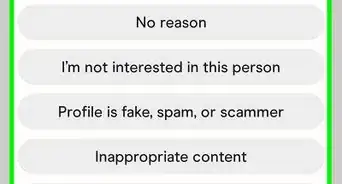
4Click or tap a reason for closing your account. Based on your answer, you might have to select a follow-up answer. For example, if you choose "Digit's monthly cost," you'll need to choose another answer.
-
5Click or tap Continue. You can opt to leave a comment or not.
-
6Click or tap Close My Account. You might be offered to continue using the app at a discount or for free, but the Close My Account button should be in white with blue text.
-
7Enter your password. You'll need to enter your password to close the account.
-
8Click or tap Close Account. This button will fill red when you enter your password.
- You'll get a confirmation page that you have successfully closed your account.
- If you have your phone number associated with your account, you will also receive a text that confirms that your account is closing.
Advertisement










About This Article

1. Go to https://digit.co/manage-account in a web browser.
2. Log in.
3. Click or tap Close Digit account.
4. Click or tap a reason for closing your account.
5. Click or tap Continue.
6. Click or tap Close My Account.
7. Enter your password.
8. Click or tap Close Account.