X
This article was co-authored by wikiHow Staff. Our trained team of editors and researchers validate articles for accuracy and comprehensiveness. wikiHow's Content Management Team carefully monitors the work from our editorial staff to ensure that each article is backed by trusted research and meets our high quality standards.
This article has been viewed 64,998 times.
Learn more...
If you'd like to block someone on Skype without removing them from your contact list, it's a very simple procedure. You can unblock them anytime, and while you have blocked them, it will simply appear to them as if you're offline a lot.
Steps
-
1Open Skype and sign in.
-
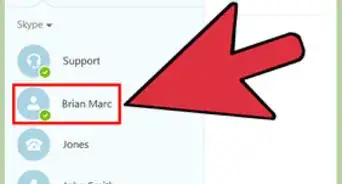
2Right click on the name of the contact you want to block and select "Block this Person"Advertisement
-
3Click "Block" to confirm this action. You can remove the contact on your list or you can send a report abuse.
-
4You will now see a crossed red circle over their Skype activity cloud.
-
5To unblock: If you ever need to restore this contact as unblocked, simply do the same activity, only this time, click on "unblock". It's as simple as that!Advertisement


Community Q&A
-
QuestionWhen you block someone on Skype, will the blocked person be aware that they've been blocked?
 Community AnswerNo, they won't.
Things You'll Need
- Skype account
- Contact you'd like to block





About This Article

wikiHow Staff
wikiHow Staff Writer
This article was co-authored by wikiHow Staff. Our trained team of editors and researchers validate articles for accuracy and comprehensiveness. wikiHow's Content Management Team carefully monitors the work from our editorial staff to ensure that each article is backed by trusted research and meets our high quality standards. This article has been viewed 64,998 times.
How helpful is this?
Co-authors: 10
Updated: March 4, 2021
Views: 64,998
Categories: Skype
Advertisement