This article was co-authored by wikiHow staff writer, Janice Tieperman. Janice is a professional and creative writer who has worked at wikiHow since 2019. With both a B.A. and M.A. in English from East Stroudsburg University, she has a passion for writing a wide variety of content for anyone and everyone. In her free time, you can find her working on a new crochet pattern, listening to true crime podcasts, or tackling a new creative writing project.
There are 18 references cited in this article, which can be found at the bottom of the page.
This article has been viewed 45,040 times.
Learn more...
eBay can be a lucrative way to make money as an online seller, but it can be difficult to get your foot in the door at first. Unfortunately, there’s no magic button or formula that will instantly get you more sales—however, there are many business practices that can help keep you one step ahead of the competition. With careful planning and organization, you can potentially set your eBay career on a path towards success.
Steps
Method 1
Method 1 of 4:Pricing, Shipping, and Auctioning Items
-
1Price your items at a competitive rate. Search on eBay for the types of items you plan on selling. While you’re browsing, take note of how much other sellers are listing their products for. If possible, try to undercut other sellers slightly to make your items more enticing.[1]
- Keep in mind that eBay takes 10% of the final payment for “buy it now” purchases.
- With auctions, you can set a default “reserve” price for the item. If no one bids up to the reserve price, you don’t have to sell the product. Instead, you’ll pay 4% of the reserve price back to eBay.
-
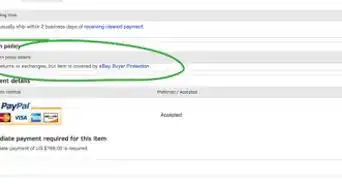
2Let your customers return their items for free. Create a 30-day return policy that lets buyers get their money back. This can provide incentive for customers to return to your shop, and may put them more at ease as they buy things from you.[2]
-
3Offer free shipping on your products. Customize your shipping rates on an ongoing basis, or provide free shipping for special promotions. This might inspire your customers to spend more, or choose your listing over another seller’s.[3]
- For instance, you can set your shipping rule so customers get free shipping if they buy more than 1 item.
-
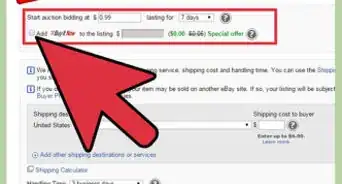
4Schedule your auctions when people are likely to be online. Think about when your potential buyers will most likely be online and browsing through eBay. Try to start your auction somewhere between 4:00 and 9:00 PM PST, and end the listing on Sunday or Monday. Choose a listing duration that best suits your own needs, and let customers do the rest.[4]
- For instance, if you need an item to sell quickly, choose a 1- or 3-day duration.
- Don’t end your auctions on Wednesday, since not as many people will likely be online.
-
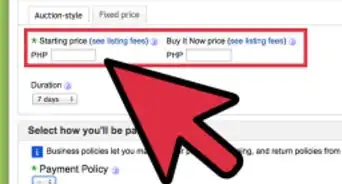
5Offer both auctions and fixed pricing options to customers. Give your customers variety when it comes to payment methods. While some buyers may enjoy the thrill of the auction, others may be looking for a quick sale. Additionally, give customers the “Best Offer” option, which lets buyers barter with a custom price.[5]
- The “Best Offer” option offers both you and the customer a lot of flexibility.


Method 2
Method 2 of 4:Listing Your Goods Properly
-
1Take advantage of your free listings. As an eBay seller, the company will give you a set amount of free listings each month, depending on what type of shop or store you have. Wait for these free listings so you don’t have to spend a lot of extra money.[6]
- For instance, if you have a standard account, you’ll get 40 free listings each month. If you’ve subscribed to an eBay store package, you’ll get at least 600 free listings each month.
-
2Optimize your product listings with relevant keywords. Use a free keyword tool to find relevant words and phrases to include in your listing. Try to keep your product descriptions to less than 200 words, so they’re easy for customers to navigate. Include these keywords 10-14 times in your descriptions to really optimize your listings.[7]
- You don’t want to overdo your keywords—try to make your writing sound natural.
- It can also help to link back to your store in the item description.
- Look for good keywords here: https://keywordtool.io/ebay.
-
3Upload high-quality pictures of your goods. Take pictures with a clear, neutral background so the items are really set apart. Check that the product is taking up most of the picture, and take a non-flash photo for an effective, realistic picture. For a more well-rounded listing, take multiple, zoomed-in shots so potential customers get a good look at what they’re buying.[8]
- Avoid using filters with your listings, as this can mislead the customer.
- Photograph smaller items next to a ruler, so customers get an idea of how large it is. You can also include smaller items in the picture for scale, like a coin.[9]
- Always center your item in the picture, whether you’re selling a brooch or a sofa.
- Don’t use props to “enhance” your listing photos. For instance, if you’re selling a dress and include a purse in the photo, customers may think that the purse is for sale, too.
-
4Include honest details about the product’s condition. Give your customers a lot of specific details about the item they’re buying. Buyers don’t want to be misled, so use accurate descriptors to label the condition of your products. Let customers know if there are any defects with the item, if the item comes without tags, or if it’s been owned before. When you’re establishing your reputation on eBay, transparency is very important.[10]
- For instance, if you’re selling a used MP3 player, you’d label it as “Pre-owned” instead of “New with tags.”
- Condition labels help customers better peruse different listings on eBay.
-
5Organize your listings with special software. Take advantage of different listing software, especially if you’re selling a large volume of items from your store. Manage your listings through this type of software, which helps you post your items consistently and efficiently.[11]
- Programs like SixBit’s eCommerce Solution are great to consider.


Method 3
Method 3 of 4:Creating an Effective Profile
-
1Upload a picture to your seller profile so you look legit. Find a picture of yourself or a professional logo that you can add to your seller profile. This helps make your store look more reputable, which may make customers more interested in doing business with you. Additionally, make a few purchases so your profile has a few ratings on it.[12]
- For instance, you can upload a picture of yourself or a specific business logo.
- Double-check that your username sounds professional and legitimate. Customers will likely prefer to do business with an account named “kellysclothes” than an account named “kellylovesfalloutboy2009.”[13]
-
2Write clear store policies on your profile to eliminate any confusion. Let buyers know what they can expect from your store by clearly outlining your business policies. State what kinds of payment methods you accept, like credit card or PayPal, along with your shipping policies. Additionally, let customers know what your return policy is in case they aren’t happy with their purchase.[14]
- For instance, you explain if you ship domestically or internationally, along with what the return window is for certain products.
- You can also let customers know how refunds will be processed, and if they’ll have to pay for postage if/when they return an item.
-
3Upgrade your account to an eBay store. If you’re ready to take your seller profile to the next level, purchase a store subscription, which gives you more listings. At this point, you can give your store an official name, where you can customize your shop.[15]
- The subscription you order will depend on the type of shop you’d like to run. For instance, if you’re opening a small shop, you’ll probably be fine with a Basic eBay Store package, which is around $8 per month.[16]
- If you’re selling a lot of items, you may want an Anchor eBay Store package, which gives you 250,000 listings for $350 each month.
-
4Create long-term goals for your store so you can plan ahead. Think about where you’d like your eBay store to end up. Focus on collecting high-quality reviews from your customers, so you can become a Top Rated Seller. Once you get enough sales and positive feedback, you can work your way up to PowerSeller.[17]
- For reference, a Top Rated Seller is a positively-rated, active user who’s made at least $1,000 and completed at least 100 sales. A PowerSeller needs to have a 98% approval rating, make $3,000 dollars through their store, and have at least 100 sales under their belt.
- For instance, your goal might be becoming a PowerSeller within the next year, or becoming a Top Rated Seller within 6 months.
- Your goal may also involve upgrading to an eBay store.


Method 4
Method 4 of 4:Engaging with Customers
-
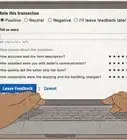
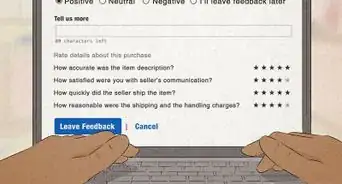
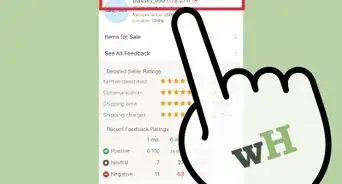
1Ask your customers to leave feedback. Encourage customers to drop a review on your profile, even if it isn’t detailed. The feedback system is simple, and lets customers rank your service as “positive,” “neutral,” or “negative.” Every bit of positive feedback helps set you apart from other sellers, and will make you look more professional and reputable on the site.[18]
- Each individual review either adds or removes a point from your total score. If you’re given a neutral review, your score won’t change overall.
-
2Respond courteously to all customer questions. Pay attention to any questions asked by your customers, and do your best to answer them as efficiently as possible. If you’re prompt and helpful, customers may be more inclined to give you a positive review.[19]
- Even if the customer is being unreasonable, do your best to be polite and amicable. This will go a long way in setting you apart as a good seller!
-
3Leave feedback on all your sales. Click on the “Leave Feedback” button within the Sellers Hub. You can give the customer a positive, neutral, or negative rating, and leave an additional comment, if you’d like. If you leave positive comments, buyers might want to purchase from you again.[20]
- For instance, you can say something: “I had an excellent experience working with this customer.”
-
4Advertise your products on social media. Create a Facebook page, Instagram profile, or other social media profile for your shop so you promote your products there. Use social media to connect with potential buyers. You can also use blogs and videos as ways to promote and advertise your store.[21]
- Don’t be disappointed if you aren’t seeing progress right away. It can take some time before you can really spread the word.



References
- ↑ https://www.goodhousekeeping.com/uk/consumer-advice/money/a575228/ebay-selling-tips/
- ↑ https://community.ebay.com/t5/eBay-for-Business/The-Seven-Secrets-to-Sue-s-Success-Selling-on-eBay/ba-p/26163522
- ↑ https://community.ebay.com/t5/eBay-for-Business/Offer-free-shipping-to-entice-buyers-to-spend-more/ba-p/26163501
- ↑ https://www.oreilly.com/library/view/ebay-hacks-2nd/059610068X/ch04s08.html
- ↑ https://www.ebay.com/help/selling/listings/selling-buy-now?id=4109
- ↑ https://www.ebay.com.au/help/selling/listings/listing-tips/free-listings?id=4163
- ↑ https://pages.ebay.com/seller-center/listing-and-marketing/boost-traffic-with-seo.html
- ↑ https://pages.ebay.com/seller-center/listing-and-marketing/photo-tips.html
- ↑ https://ir.ebaystatic.com/pictures/aw/sell/Photo_Center_Guide_edit.pdf
- ↑ https://www.forbes.com/sites/davidseideman/2014/05/20/part-2-how-to-hit-a-home-run-selling-on-ebay/
- ↑ https://community.ebay.com/t5/eBay-for-Business/The-Seven-Secrets-to-Sue-s-Success-Selling-on-eBay/ba-p/26163522
- ↑ https://www.goodhousekeeping.com/uk/consumer-advice/money/a575228/ebay-selling-tips/
- ↑ https://www.savethestudent.org/make-money/ebay-selling-tips.html
- ↑ https://sellercentre.ebay.com.au/create-your-business-policies
- ↑ https://www.ebay.com/help/selling/ebay-stores/open-ebay-store?id=4092
- ↑ https://www.ebay.com/help/fees-invoices/feesinvoices-fees-selling/store-fees?id=4122
- ↑ https://www.ebay.com/help/selling/seller-levels-performance-standards/seller-levels-performance-standards?id=4080
- ↑ https://www.webretailer.com/b/ebay-feedback/
- ↑ https://community.ebay.com/t5/eBay-for-Business/The-Seven-Secrets-to-Sue-s-Success-Selling-on-eBay/ba-p/26163522
- ↑ https://www.businessinsider.com/how-to-leave-feedback-on-ebay
- ↑ https://pages.ebay.com/seller-center/listing-and-marketing/social-media.html
- ↑ https://www.goodhousekeeping.com/uk/consumer-advice/money/a575228/ebay-selling-tips/
- ↑ https://community.ebay.com/t5/eBay-for-Business/The-Seven-Secrets-to-Sue-s-Success-Selling-on-eBay/ba-p/26163522
- ↑ https://www.forbes.com/sites/davidseideman/2014/05/20/part-2-how-to-hit-a-home-run-selling-on-ebay/
- ↑ https://www.forbes.com/sites/davidseideman/2014/05/20/part-2-how-to-hit-a-home-run-selling-on-ebay/
About This Article