X
wikiHow is a “wiki,” similar to Wikipedia, which means that many of our articles are co-written by multiple authors. To create this article, 15 people, some anonymous, worked to edit and improve it over time.
This article has been viewed 103,152 times.
Learn more...
Want to play online with your friends on your 3DS? In order to do that, you both need to exchange friend codes. Grab your system now and follow these steps.
Steps
-
1Turn on your Nintendo 3DS.
-
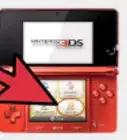
2Press the little orange smiley face icon at the very top of the menu. It's called your Friend List.Advertisement
-
3Once it's activated, press Register Friend (located at the top of the touch screen).
-
4From here, there are two options for adding friends. If your friend's 3DS is within range (as in within a few feet), use Local. If your friend's 3DS is far away from your current location, use Internet. Note that if you use the Internet option, both of you must be connected to Wi-Fi when you are adding each other.
- If you pressed Local, tell your friend to also select Local on their 3DS. If it has been done correctly, you should see your friend's Mii on the bottom screen. Tap the friend card to add them.
- If you pressed Internet, you must ask your friend what their friend code is. It is located on the top screen of their own card (the first friend card).
-
5Once you have their friend code, enter it into the number pad. Then enter a temporary name of your friend. Your friend should do the same.
-
6Once the Mii of your friend shows up, you're done!Advertisement


Community Q&A
-
QuestionHow can I easily give others my friend code?
 NightcatCommunity AnswerI'd recommend any social media that has a direct messaging system. Those work for me.
 -
QuestionMy son can't get his Friend Code for his Nintendo 3DS. What can he do?
 Community AnswerTurn on/open the Nintendo 3DS, then tap the orange face at the top of the touchscreen. Switch over to the card with the Personal Mii (the Mii of the 3DS owner) and look at the top screen. At the bottom of the card you will see a 12-digit number. That is your Friend Code.
 -
QuestionMy Nintendo's friend address is replaced by question marks. How do I get rid of those?
 Community AnswerIf a Mii's name is replaced by '???', this means it's a blocked user. To unblock, go into Mii maker. Click on the list of controls, then enter Blocked User Settings. From here you can either block or unblock people on your friend list.
 -
QuestionWhy isn't this working for me?Community AnswerFirst, make sure that you are connected to the internet, specifically wireless. Your friend should also have wireless internet activated. Also, make sure that you enter the code correctly, and that you and your friend have both selected "Local."
-
QuestionWhat is a "provisionally registered friend?"
 Community AnswerIt means that you've registered your friend, but they haven't registered you. Check with them to make sure they've entered your code correctly.
 -
QuestionMy Friend Code keeps saying it's invalid when I give it to others. How do I resolve this?NightcatCommunity AnswerAs a last resort, you can format your memory on your 3DS. This will change your Friend Code. Note that this clears everything stored on your 3DS (not cartridge data).
-
QuestionHow do I remove friends from my Nintendo 3DS?Community AnswerTap settings on the first card on the top left and choose "Delete Friend Card."
-
QuestionCan I add a friend on a DS from a 2DS?
 Community AnswerNo, 3DS/2DS systems cannot connect to a Nintendo DS. A 3DS can connect to a 2DS however, because those are the same generation of system.
Warnings
- Note that if you used the Internet option, both parties must enter in friend codes. Otherwise, your friend will end up being listed as a provisionally registered friend.Thanks!
Advertisement
Things You'll Need
- Nintendo 3DS
- Friend code(s)
- Internet connection (for the Internet option)

About This Article
Advertisement