This article was written by Jack Lloyd. Jack Lloyd is a Technology Writer and Editor for wikiHow. He has over two years of experience writing and editing technology-related articles. He is technology enthusiast and an English teacher.
This article has been viewed 887,557 times.
The "open web" or "surface web" is the web you're used to—websites that you can find in search engines. In contrast, the Deep Web is any online information which isn't indexed by a search engine (e.g., Google). If you want to find Deep Web data, you'd need to go directly to its source rather than doing a quick Google search. The Deep Web is radically different than the Dark Web, which is often used to conduct illicit or anonymous activity. This wikiHow teaches you how to find information on the Deep Web, as well as how to safely dip your toes into the Dark Web.
Steps
Method 1
Method 1 of 2:Accessing the Deep Web
-
1Understand how search engines work. Search engines "crawl" through the web by following links on accessible pages. If a page is linked to another page that's in Bing or Google, it will, usually, be added to the search index. The search engine crawls constantly to keep its index up to date. Since Deep Web content is not part of this surface layer, you can't find Deep Web content using a traditional search engine.
- Although the Deep Web sounds mysterious, you've already spent time there! Common examples of the Deep Web include library archives, private databases, online banking accounts, subscription-only magazines, and court dockets. Basically, anything that requires a password, subscription, or even a CAPTCHA to access is part of the Deep Web.
- The Deep Web is not the Dark Web. The Dark Web requires using a special web browser to access anonymous websites, while the Deep Web is accessible through your regular web browser.
-
2Try a website's dedicated search engine. Many websites have search engines built into them, which allow you to find information on the site that isn't index by Google or Bing. The information you find on these internal search engines is part of the Deep Web. Millions of websites have their own search engines, but here are a few that you may find interesting:
- The United States Congress website has a searchable index of bills, laws, and congressional records.
- The United States Copyright Office lets you search for copyright information.
- Elephind indexes nearly 4 million newspapers.
- IPL's repository of more than 500,000 academic essays is searchable.
- Facebook's search tool is even a Deep Web search engine—you can find lots of users, groups, and Pages that aren't indexed by mainstream search engines.
Advertisement -
3Find archived websites that no longer exist. The Internet Archive's Wayback Machine is an amazing Deep Web tool that lets you view websites that no longer exist, as well as older versions of websites that exist now.
- For example, if you search for Facebook.com, you can see what Facebook's homepage looked like in 2006.
- Not all websites are archived by the WayBack Machine—some webmasters prefer their sites not be indexed and are able to opt out.
-
4Search and browse academic databases and archives. There are plenty of great databases that contain peer-reviewed and other academic data that isn't completely searchable in Google or Bing, including:
- Web of Science indexes a variety of multidisciplinary academic articles and citations.
- PubMed indexes articles about biomedical topics. Some of what is on PubMed is indexed by Google, but you can browse and search the website for difficult-to-find articles.
- Project Muse lets you search peer-reviewed academic journal articles and e-books about the humanities.
- Voice of the Shuttle is another humanities-focused resource curated by humans who share helpful and interesting Deep Web content.
- LexisNexis requires a subscription for most people, but if you're a student, you may already have one. This tool is invaluable for finding information from magazines, news articles, and even individuals' public records.
- Library of Congress's Digital Collections is home to hundreds of manuscripts, photos, videos, articles, and other historical information you won't find in Google.
- Most regional libraries have extensive websites available for members. As a library card holder, you can search dozens to hundreds of databases that you won't find anywhere on the internet. This includes genealogical information, local news archives, public directories, oral histories, and much more.
-
5Try some Deep Web tools. You already know that anything behind a paywall, username and password, or CAPTCHA is technically the Deep Web. What you might not realize is that many online tools that show live content are also on the Deep Web. Some examples:
- The FAA's Air Traffic Control System Command Center lets you view live flight delays across the United States.
- Melissa lets you look up and verify the names and addresses of people across the globe.
- The United States Department of Transportation is home to a great lookup tool that lets you find documented safety issues and recalls by vehicle—just enter your VIN number to find out if your vehicle is safe.
- Project Gutenburg is home to over 60,000 free eBooks you can read on your eReader, computer, or tablet.
-
6Browse the Deep Web as you please. As previously mentioned, it's very difficult to get into trouble on the Deep Web due to the Deep Web's actual nature. As long as you observe basic Internet safety (e.g., don't give out personal information, don't download untrustworthy files, etc.), you should be fine.Advertisement


Method 2
Method 2 of 2:Accessing the Dark Web
-
1Know what the Dark Web is. The Dark Web refers to a small sliver of Deep Web data that is impossible to access without special software and links. Since the Dark Web's focus is on anonymity, it's home to a lot of illicit content, which gives it a bad reputation.
- Although the Dark Web is most known for its illegal marketplaces, it's also used to provide anonymity to journalists, political dissidents, whistleblowers, and the like.
- Dark Web addresses typically look like long strings of letters and numbers, and always end with .onion.
- Because of their strange web addresses, you can only access the Dark Web using a web browser made for .onion websites. Tor is the most common example of this.[1]
-
2Understand the risks. While the Dark Web is mostly harmless if you aren't actively trying to get into trouble, the fact remains that the Dark Web's is notorious for being home to criminal activities. While most Dark Web horror stories are nothing more than campfire tales, you should refrain from contacting anyone, downloading items, or making purchases from the Dark Web.
- Essentially, if you aren't attempting to get into illegal sites, you'll see a lot of broken links and slow load times for normal sites.
-
3Never access the Dark Web without a VPN. Before downloading Tor, which is the most common Dark Web-accessible web browser, you must install and enable a Virtual Private Network (VPN) to encrypt your connection. NordVPN Surfshark, and ExpressVPN are common choices, but you can choose any VPN that has the following features:[2]
- A kill switch for when your VPN goes down.
- A no-log policy, which can protect you if the government demands log files from your VPN server.
- Anonymous sign-up.
- Quick load times.
- Protection against IP and DNS leaks.
- The ability to connect via another country's server.
-
4Make sure that your VPN is on and routed through a different country. Your VPN will hide your IP address from anyone attempting to view your location; you'll gain an extra level of security by making sure that the IP address other people can see links back to a country other than your current one.
-
5Download and install Tor. You can find Tor, the most popular browser used to access the Dark Web, at https://www.torproject.org/download.
-
6Avoid using Windows to access the Dark Web. While more secure than in past renditions, Windows 10 is still vulnerable to attacks and malware. This makes browsing the Dark Web dangerous.
- Linux is strongly recommended for people who plan on using the Dark Web, with Tails being a popular option.
- You could use a virtual machine instead of booting Tails from a USB or optical drive. VirtualBox is recommended.
- If you're on a Mac, you should be fine if you use a VPN and Tor. Just makes sure you're protected from viruses and other malware—Malwarebytes is a great option for malware protection.
-
7Take basic precautions before accessing the Dark Web. There are a couple of basic things that you should do in order to prevent unpleasant encounters on the Dark Web:
- Cover your computer's webcam or unplug it if you can.
- If you're using a Wi-Fi connection, password-protect it if you haven't yet done so.
-
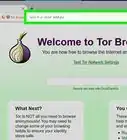
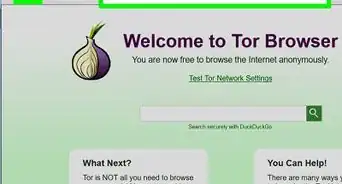
8Connect to Tor. Once your VPN is turned on and no browser windows are open, open Tor and then click Connect. This will open the Tor home page.
- Tor recommends that you don't maximize the Tor window, as doing so will publicize your screen size—this could be problematic if you're trying to be anonymous.[3]
-
9Change your Tor security settings. On the Tor home page, click the onion icon in the upper-left side of the page, then drag the slider all the way up to the top. This will ensure that tracking scripts and other forms of browser monitoring cannot be loaded.
-
10Open a Dark Web search engine. Common (and relatively safe) Dark Web search engines include the following:
- DuckDuckGo, which is also available on the plain old word wide web, is also accessible on the Dark Web. Find it at 3g2upl4pq6kufc4m.onion.[4]
- Torch - A commonly used Dark Web search engine with over one million indexed hidden pages. You can access it at cnkj6nippubgycuj.onion.
- notEvil - Uses a Google-like interface and blocks ads. You'll find it at hss3uro2hsxfogfq.onion
- Haystak – A Dark Web search engine with over 1.5 billion pages in its archive. It's located at haystakvxad7wbk5.onion.
- Be very careful when using other Dark Web search engines, as many could point you in disturbing directions!
-
11Browse the Dark Web. Using your preferred search engine, and with adequate protection, you can browse the Dark Web as you please. Just remember to avoid suspicious links or websites, and never download or open files found on the Dark Web.Advertisement


Community Q&A
-
QuestionShould I take any precautions while on the deep web?
 Community AnswerCover your webcam and microphone. Do not enter your email address or any passwords while using TOR. Hide your IP address. Be aware in advance that you may see things you later wish you hadn't.
 -
QuestionIf someone is trying to hunt me down what do I need to do in order to keep out of their way?
 JayRulesWikihowCommunity AnswerMake sure you do not make any contact with ANYONE on the deep web so you do not have this issue. Have a VPN and antivirus protection software on hand so you can keep yourself safe from hacks. If possible, use an old computer you don't mind getting messed up and make sure it is running Mac or Linux, so it is less likely to get viruses. I recommend using a VM.
 -
QuestionHow much trouble can I get into just for venturing onto the deep web?
 Community AnswerNone, as long as you don't do anything illegal like buying or selling illicit items. You are protected under the first amendment. Also, follow good OPSEC.
 -
QuestionWhat should I use to hide my IP address?Community AnswerYou should use Tor browser and a VPN for more safety.
-
QuestionWhat happens if I don't hide my IP address?
 Isaiah SearsCommunity AnswerTor automatically hides it for you. No need to worry about it. That said, it's still risky to buy or look at illegal content.
 -
QuestionIf the first amendment doesn't apply to me because I am not in the U.S., will going into the Deep Web still get me in trouble?Community AnswerYes, if you are buying or selling anything illegal. It depends on your country's extradition treaty status with USA.
-
QuestionIs TOR the best way to access the deep web?Community AnswerTOR represents the best way to access the deep web, but it is not that simple to access it.
-
QuestionWhat are good things to look for on the deep web?
 Community AnswerWhatever comes to mind. The deep web has a lot of illegal stuff. You need to be careful. Like other comments said, don't enter anything that is personal, like date of birth, email addresses, passwords, etc.
 -
QuestionHow do I contact people on the Deep Web?Community AnswerIt is highly recommended not to make contact with anyone through the deep web.
-
QuestionIs necessary to not to use Windows or a laptop?Community AnswerIt's not necessary, but it is recommended.
Warnings
- Never download files or accept chat requests while on the Dark Web. Torrenting via the Dark Web is an especially bad idea.Thanks!
- Much of the Dark Web's illegal content is based around things like human trafficking, illicit drug and firearm sales, and so on. Do not search for or click links to pages referencing or participating in these topics, and if you do so and get caught, don't blame wikiHow.Thanks!





References
- ↑ https://www.torproject.org/download/
- ↑ https://www.techradar.com/news/tor-and-vpn-how-well-do-they-mix
- ↑ https://www.gizmodo.com.au/2021/03/never-explore-the-dark-web-in-full-screen/
- ↑ https://www.hackread.com/8-best-dark-web-search-engines-for-2020/
- ↑ https://www.techadvisor.co.uk/how-to/internet/dark-web-3593569/
About This Article
1. Connect to a VPN.
2. Download and install Tor.
3. Connect to Tor.
4. Access a Deep or Dark Web search engine (e.g. Torch, DuckDuckGo, notEvil).
5. Search for subjects and keywords.